 RaveMaker
Overview
Create an Apple OS X 10.8 Mountain Lion Bootable USB installation from Windows 7 using PowerISO Application.

Requirements
To create an Apple Mountain Lion bootable USB Installation you will need PowerISO and an Apple OS X installation in ISO format.
- Download And install PowerISO
Create a Mountain Lion bootable USB installation
- Open PowerISO and continue unregistered.
- Click on the Tools Menu and select “Create Bootable USB Drive”
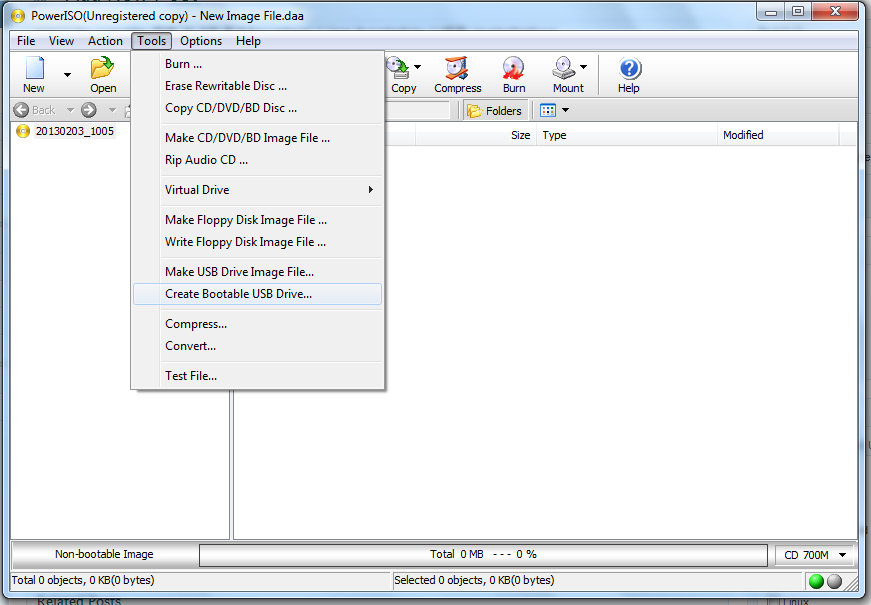
- Select Source image file - OS X ISO
- Select Destination USB Drive
- Write method will change automatically to “Write RAW Image File to USB Drive”
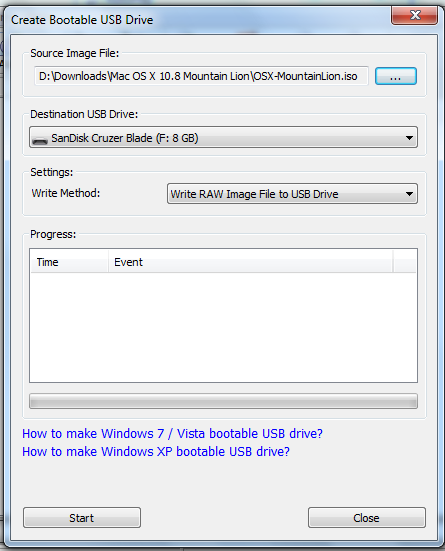
- Click Start and wait for your USB Drive to become ready
All Done.