 ETCS
ETCS
centos grails
A beginner-friendly guide to installing the Grails web framework on CentOS 6.x using GVM, manual installation, or Git.
Prerequisities
You have to install Groovy (which require JDK). If you don’t have Groovy (And JDK) installed follow those instructions.
- Java SDK 1.4+ for Grails 1.0.x and 1.1.x
- Java SDK 1.5+ for Grails 1.2 or greater (For this tutorial make sure you have JDK 1.5+ installed)
Install Grails
Option 1: Using GVM (Recommended)
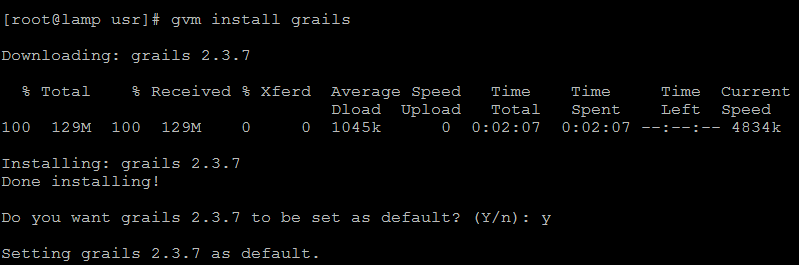
If you’ve installed groovy using GVM, you can use the GVM to install grails too. use:
gvm install grails
Option 2: Manual Installation
We’d go by the official Grails manual:
The folder we’ll install Grails is: /usr/grails, but you can choose any other as you like.
Init Folder
cd /usr
mkdir grails
cd grails
Here we’ll put the grails files by version.
Visit the download page to get the latest version. as for now it’s 2.3.7
wget http://dist.springframework.org.s3.amazonaws.com/release/GRAILS/grails-2.3.7.zip
unzip grails-2.3.7.zip
rm grails-2.3.7.zip
Install wget & unzip if you don’t yet have them install by: yum install wget unzip
add the following to your ~/.bash_profile or ~/.bash_rc (or wherever you init your user environment):
# grails
export GRAILS_HOME=/usr/grails/grails-2.3.7
export PATH=$PATH:$GRAILS_HOME/bin
That’s it
Option 3: Using GIT
If you want to be updated with latest patches (and bugs) you can clone the git repo.
Prerequisities: you should have JDK installed, your JAVA_HOME set and GIT installed (yum install git).
For the 2.0.x and the ‘master’ branch:
cd /usr
git clone https://github.com/grails/grails-core
cd grails-core && ./gradlew install
and set your GRAILS_HOME in the ~/.bash_profile (or ~.bash_rc):
# grails
export GRAILS_HOME=/usr/grails-core
export PATH=$PATH:$GRAILS_HOME/bin
If you want to install older branch read here.
Testing grails
Type at command:
grails --version
You should get something like this output (depend on version)

That’s It! you have centos grails installed.
Cheers!