 RaveMaker
Overview
The famous RTS game Command & Conquer - Red Alert 2 by Westwood Studios was released on October 2000 but there are still many who consider this game a must. Westwood Studios was bought by Electronic Arts (EA) in 1998, and closed by EA in 2003. With the release of Microsoft Windows 8 the game Red Alert 2 stopped working. Follow these next few steps to Fix Red Alert 2 on Windows 8 x32 and x64 bit.
The following instructions were tested on Red Alert 2 Yuri’s Revenge with the official 1.001 Patch
Red Alert 2 Windows 8 Fix
INI Files
- Open RA2.INI, RA2MD.INI with any text editor and go to the [Video] block.
- Add ‘VideoBackBuffer=no’
- Set the ScreenWidth, ScreenHeight to your resolution.
For example a 1920x1080 HD Resolution:
\[Video\] ScreenWidth=1920 ScreenHeight=1080 StretchMovies=no VideoBackBuffer=no
Compatibility Mode
- Right click gamemd.exe and go to the “Compatibility” tab.
- Click “Change Settings for all users”
- Mark the Compatibility Mode and set to WinXP SP3
- Mark Reduced color mode and set to 16bit
- Mark “Run this program as an administrator”
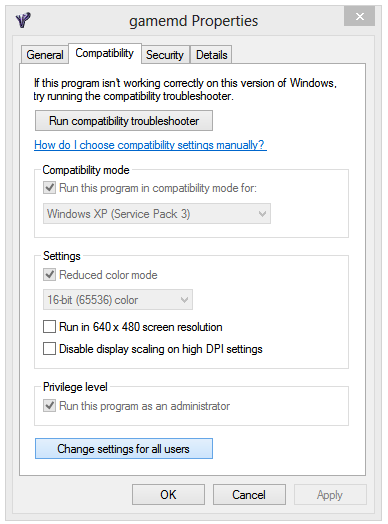
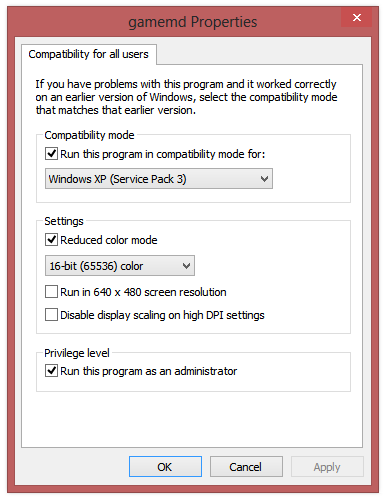
Run the Game.
NPatch
If you still have issues with the game then you might need to install NPatch. Download the first file and install it. Repeat the Compatibility Mode settings from the previous step.
Enjoy.