 ETCS
ETCS
Overview
You will learn how to add necessary META your website as a tile to support windows 8 tile start menu pin using IE 10. Just like windows 8 application do!.
Instructions
With the new windows 8 metro interface your can now add META to your web-site
to enable PIN to start menu of your webside using IE 10.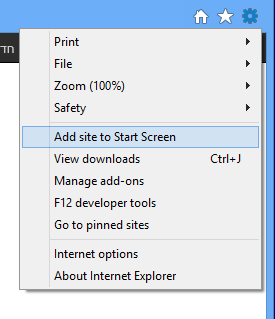
<meta name="msapplication-TileColor" content="#123456"/> <meta name="msapplication-TileImage" content="your\_logo.png"/>
- First Meta, msapplication-TileColor is the Tile background color. you can use any Hex Color generator.
- Second Meta, msapplication-TileImage is link to a .png file contains your logo to display inside the Tile. if missing, Windows 8 will use the favicon.
- Must be inside thetags
Note: Tiles come in one size: 144x144 pixels, the required type is PNG 32bit (PNG 24bit save to web in Adobe Photoshop).

You can also Connect your website to your Windows Store app (Windows) at MSDN

If you are using WordPress you can use our custom WordPress plugin here.